








OwlPay Wallet Pro: Complete Guide (Part 1)|Create or Import Your Wallet in Minutes

OwlPay Wallet Pro lets you send USDC directly to local bank accounts in 20+ countries with instant fiat conversion, no steep fees, no intermediary banks, and funds landing swiftly as regular local currency, bridging stablecoins and traditional finance like never before!
This article walks you step-by-step from absolute zero all the way to “Create Your First Wallet or Import an Existing Wallet.” It guides you through setting up your OwlPay Wallet Pro completely. The next article will show you how to “Add Recipient” and start sending money globally.
Steps to Get Started with OwlPay Wallet Pro
Step 1: Download and Install
If you haven’t downloaded OwlPay Wallet Pro yet, follow the steps below. If you already have the app installed, skip to Step 2.
1. Install the official app on App Store (iPhone) or Google Play Store (Android)
2. Open the app
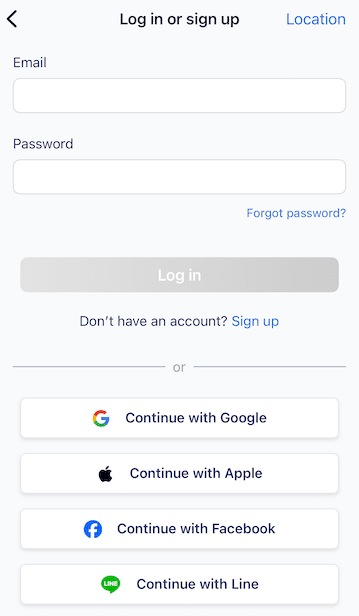
Step 2: Register a New Account
1. Tap [Sign Up] (If you don’t have an account)
2. Fastest options:
- Continue with Google / Apple / Facebook / Line
Step 3: Create Your First Wallet or Import an Existing Wallet
1. Choose [Create Wallet]
- The app instantly creates your wallet
- Backup your seed phrase (12–24 words) [Important] It is the ONLY time you can safely back up your seed phrase.
- Choose your backup method (2 options are available):
- Back up to iCloud (iOS) / Google Drive (Android) – encrypted cloud backup
- Manual backup (strongly recommended as a second layer)
- If you choose iCloud/Google Drive backup:
- Tap [Back up to iCloud] → Enter a strong backup password (minimum 8 characters, must contain letters + numbers) → Re-enter to confirm [This password CANNOT be recovered. Keep it safe!]
- Manual backup:
- The app will show your 12-word seed phrase
- Tap “Copy to clipboard” or write it down on paper in the exact order
- Confirm you have saved the phrase
- Check the box “I understand that if the seed phrase is lost, I will permanently lose access to my assets.” and [Finished]
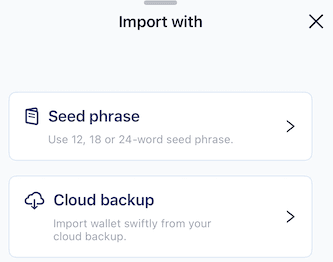
2. Alternative: Choose [Import wallet]
- If you already have a wallet elsewhere (MetaMask, Trust Wallet, etc.), you can import it instead of creating a new one.
On the “Create Wallet or Import Wallet” screen, tap [Import wallet] - Choose your import method
- Seed phrase → Most common method (12, 18, or 24 words)
- Cloud backup → Only if you previously backed up this exact wallet to iCloud/Google Drive using OwlPay
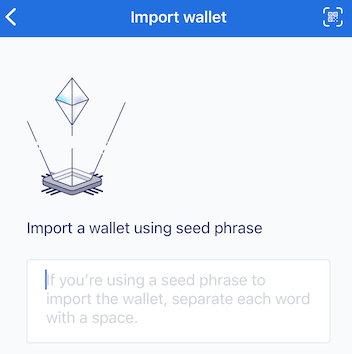
- Importing with Seed Phrase
- Tap [Seed phrase]: type or paste your 12/18/24-word seed phrase
- Words must be separated by single spaces
- Tap [Seed phrase]: type or paste your 12/18/24-word seed phrase
- No extra spaces at the beginning or end
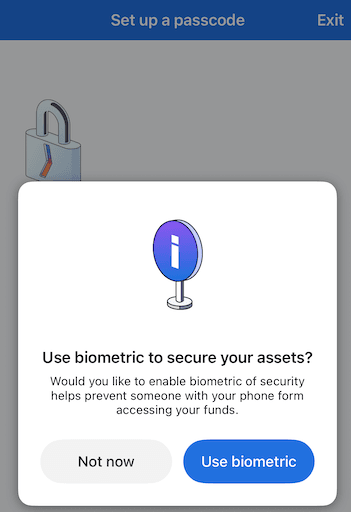
- Set up biometric security (Optional but recommended)
- Tap [Use biometric] (Face ID / Touch ID on iOS, fingerprint on Android)
- Or tap “Not now” if you prefer only passcode
- Wait a few seconds while the app restores your wallet
Congratulations! Your existing wallet has been successfully imported into OwlPay Wallet Pro
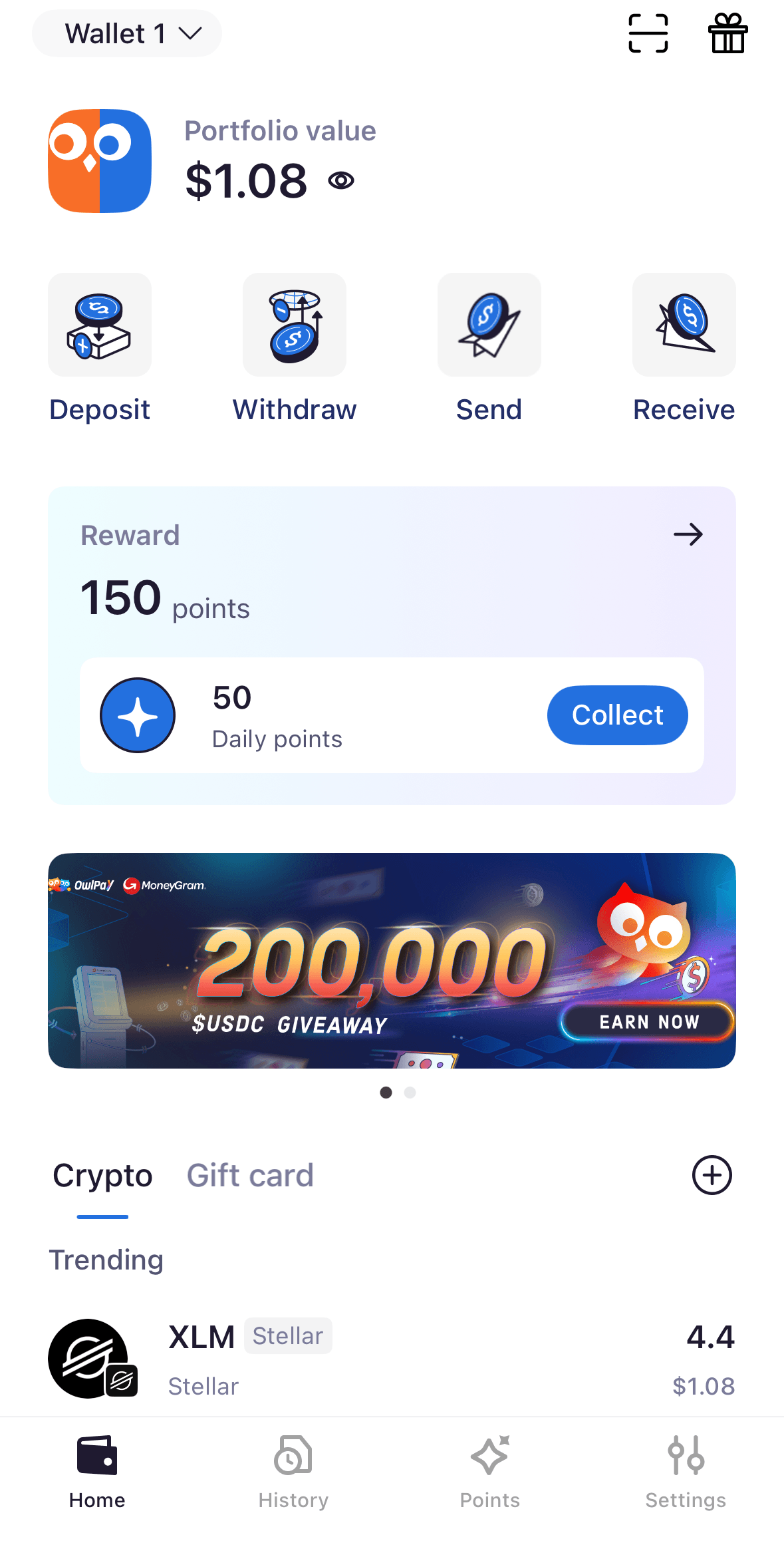
Quick Dashboard Tour
Top Bar:
- Wallet 1 ↓
Wallet selector. Tap here to switch between multiple wallets or create a new one.
- Portfolio value $X.XX
Total value of all assets in the currently selected wallet (shown in USD).
(Tap the eye icon 👁 on the right to hide your portfolio value for extra privacy!)
Main Action Buttons (Middle Row):
- Deposit → Transfer crypto into this wallet from an exchange or another wallet
- Withdraw → Send crypto out to an external address
- Send → Pay or transfer to friends and merchants
- Receive → Show your address & QR code so others can send crypto to you
Daily Rewards & Points Section:
- Reward: 150 points → Your current points balance
- 50 Daily points → Log in every day and tap the blue Collect button to claim 50 free points!
Quick Access Features:
- Crypto Gift Card → Buy or send gift cards payable in crypto
- Trending coins list → Hot cryptocurrencies at a glance (e.g., Stellar XLM at $1.08 right now)
Bottom Navigation Bar:
- Home → Back to this dashboard (you’re here now)
- History → View all transactions
- Points → Check rewards, tasks, and leaderboard
- Settings → Manage wallets, security, notifications, and more
Related Articles
- OwlPay Wallet Pro: Complete Guide (Part 2)|Add Recipients and Start Sending Globally
- OwlPay Wallet Pro: Complete Guide (Part 3)|Send USDC with Real-Time Conversion to Local Currency
- New Feature: Send USDC Directly to Local Bank Accounts | OwlPay Wallet Pro
- AI Agent Wallets Explained: The Complete 2026 Guide